


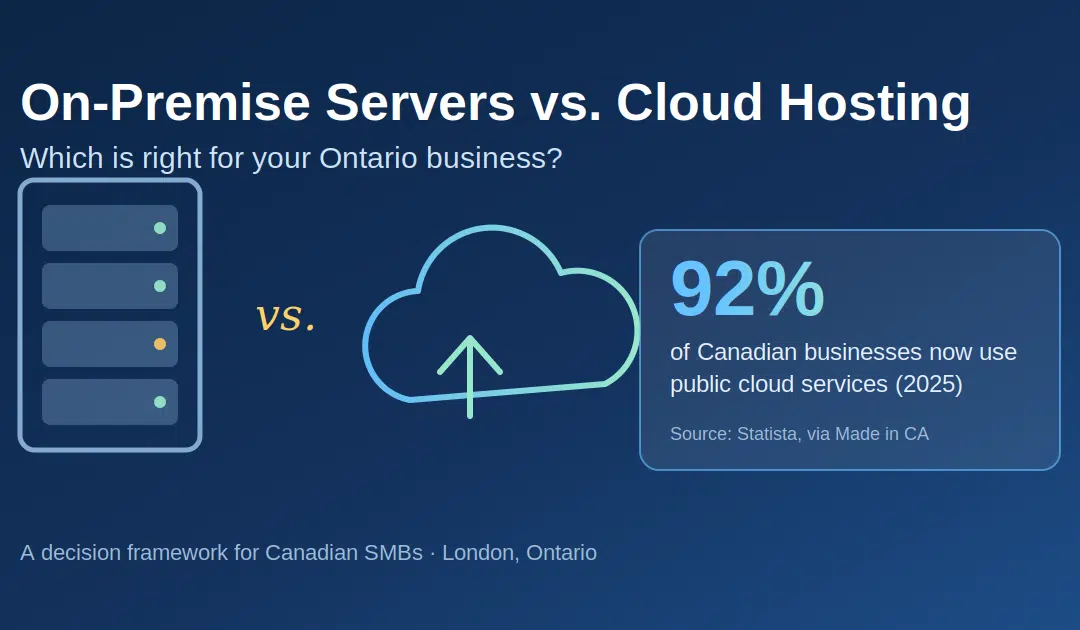
That server humming away in your back office has served you well. But as of 2025, 92% of Canadian businesses use public cloud services in some form (Statista, via Made in CA, 2025) — and if you’re still running everything on-premise, you’ve probably wondered whether you’re falling behind or wisely avoiding a bandwagon.
The honest answer? It depends on your workloads, compliance obligations, and appetite for capital spending. This guide gives you a decision framework — not a sales pitch.
Key Takeaways
- In 2025, 92% of Canadian businesses used public cloud services, allocating roughly 29% of IT budgets to it (Statista, via Made in CA, 2025)
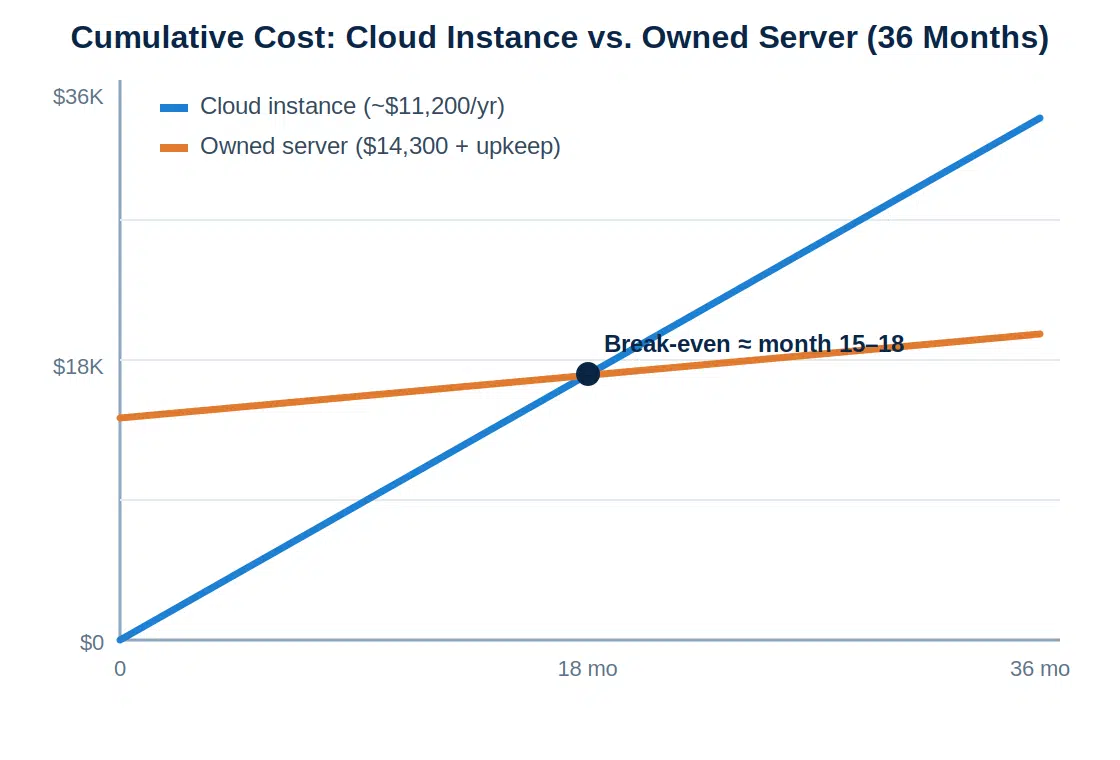
- On-premise can still win for stable, predictable workloads — one 2026 analysis found an owned server breaks even against a comparable cloud instance after about 15 months (Spacelift, 2026)
- Cloud wins on scalability, disaster recovery, and predictable OpEx — the deciding factors for most Ontario SMBs
What Is On-Premise Infrastructure?
On-premise infrastructure means servers, storage, and networking gear that you buy, house, and maintain at your own location. It’s a capital expenditure (CapEx) model: as one 2026 pricing comparison notes, a mid-range Dell PowerEdge server lists at roughly $14,300 USD, paid upfront, then used for years (Spacelift, 2026).
You control everything — the hardware, the data, the security perimeter. Nothing leaves your building unless you send it out. For some owners, that’s genuine peace of mind.
But control has a price tag beyond the invoice. The biggest hidden cost in on-premise setups isn’t hardware — it’s people. Skilled staff time for patching, maintenance, and monitoring is a large, ongoing investment (Cloudvara, 2025). Add electricity, cooling, backup systems, and a hardware refresh every 3–7 years, and the “one-time” purchase becomes a recurring commitment.
How we assess existing server environments
What Is Managed Cloud Hosting?
Managed cloud hosting means your servers, storage, and applications run in a provider’s data centre, and a managed services partner handles the administration — patching, monitoring, backups, and security. In 2025, Canadian spending on public cloud reached approximately US$17.8 billion, up from US$5.8 billion in 2019 (Statista, via Made in CA, 2025).
The “managed” part matters more than most comparisons admit. Raw cloud (renting a virtual machine from AWS or Azure) still leaves you responsible for configuration, updates, and security hardening. Managed cloud hosting shifts that operational burden to a team that does it all day, every day.
According to a 2025 analysis, roughly 21% of enterprise cloud spending — about $44.5 billion — is wasted on underutilized resources (HyperSense Software, 2025). That single statistic explains why management matters: cloud isn’t automatically cheaper. It’s cheaper when someone rightsizes it and keeps it that way.
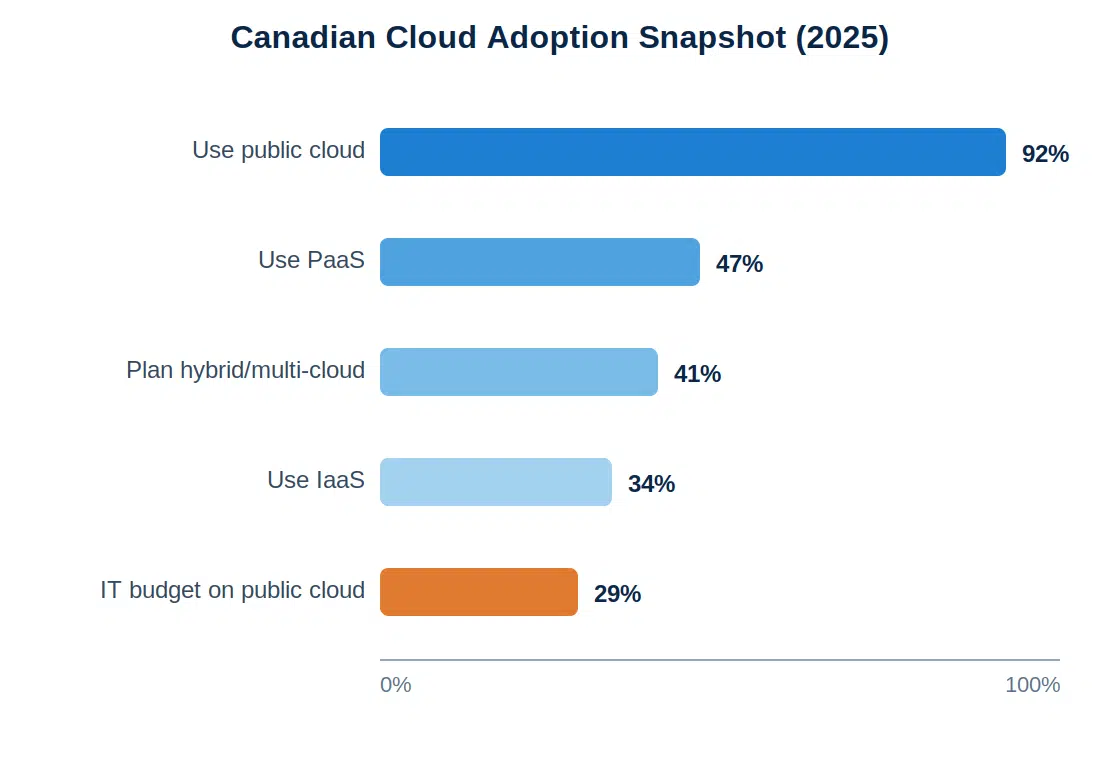
Worth knowing: Both major hyperscalers operate Canadian regions (Toronto and Montreal), and providers like IBM and OVHcloud have expanded Canadian data centres. “Cloud” no longer has to mean “data leaves Canada” — a distinction that changes the compliance conversation entirely for Ontario businesses.
Comparison Table: On-Premise vs. Cloud for Canadian Businesses
How do the two models actually stack up? Here’s the side-by-side view across the five factors Ontario business owners ask us about most.
| Factor | On-Premise Servers | Managed Cloud Hosting |
|---|---|---|
| Cost model | High upfront CapEx (~$14,300 USD for a mid-range server) plus staff, power, cooling, and refresh cycles | Predictable monthly OpEx; no hardware purchase; risk of waste without active management |
| Uptime | Depends entirely on your hardware, backups, and staff; a failed component can mean days offline | Redundant infrastructure with SLAs; 90% of organizations now expect 99.99% availability (ITIC, 2023–24) |
| Security | Full physical control, but you own every patch and every gap | Enterprise-grade controls, 24/7 monitoring; provider handles infrastructure-level security |
| Scalability | Fixed capacity; growth means buying and installing new hardware | Scale up or down in minutes; pay only for what you use |
| Compliance & data residency | Data physically stays in Ontario by default | Canadian regions (Toronto/Montreal) keep data in-country; supports PIPEDA obligations |
The pattern is clear: on-premise trades flexibility for control, and cloud trades control for resilience. Neither column wins every row — which is exactly why a decision framework beats a feature list.
When Does On-Premise Still Make Sense?
On-premise isn’t dead — far from it. In 2026, comparative analyses continue to show that for stable, predictable, always-on workloads, an owned server becomes more economical than a comparable cloud instance after roughly 15 months (Spacelift, 2026). That’s why “cloud repatriation” became a real trend, with companies like Dropbox and 37signals moving workloads back in-house (HyperSense Software, 2025).
On-premise deserves serious consideration when:
- Your workload is flat and predictable. Steady utilization keeps owned hardware busy and cost-efficient.
- You already have current hardware and skilled in-house staff. Recent capable infrastructure shifts the math.
- Latency-sensitive local systems. Manufacturing floor controls or equipment that can’t tolerate an internet dependency.
- Contractual restrictions that explicitly require locally hosted data — rarer than assumed, but real.
Notice what’s not on this list: security. The instinct that “my data is safer in my closet” doesn’t survive contact with the numbers. According to the Verizon 2025 Data Breach Investigations Report, ransomware appeared in 88% of breaches at small businesses, versus 39% at large enterprises (Verizon DBIR SMB Snapshot, 2025). Attackers target the least-defended environments — and a single office server rarely matches a professionally monitored one.
When Is Cloud the Better Choice for a Canadian Business?
For most growing Ontario SMBs, cloud is the stronger default — and Canadian adoption data backs that up. Canada’s cloud computing market is projected to grow at a 20.5% compound annual rate from 2025 to 2030 (Grand View Research, 2025), and SME adoption is accelerating at nearly 18% annually, helped by federal programs like CDAP (Mordor Intelligence, 2026).
Cloud is usually the right call when:
- Downtime would hurt badly. A 2025 ITIC/Calyptix study found many SMBs lose $25,000 or more per hour of downtime (ITIC/Calyptix, 2025). Could your business absorb a two-day outage while replacement parts ship?
- Your team works remotely or across locations. Cloud makes access location-independent by design.
- You’re growing or seasonal. Pay for capacity in December, drop it in January.
- Your server is approaching its refresh date. The moment before a five-figure hardware purchase is the cheapest possible time to switch models.
- Disaster recovery keeps you up at night. Cloud providers build in geo-redundant backup and failover that would cost an SMB a fortune to replicate. [INTERNAL-LINK: our disaster recovery services for Ontario businesses → Disaster Recovery page]
There’s also a security dividend that surprises people. In 2025, IBM’s Cost of a Data Breach Report found the global average breach cost fell 9% to US$4.44 million — the first decline in five years — driven largely by faster, AI-assisted detection and containment (IBM, 2025). That tooling lives almost exclusively in professionally managed environments. It’s not the kind of capability a two-person IT team can bolt onto a closet server.
What Does Cloud Migration Actually Involve?
Migration is a staged process, not a weekend cutover — and understanding the stages removes most of the fear. A well-run SMB migration moves through four phases over a few weeks to a few months:
- Assessment. Inventory every application, database, and integration. Which workloads are cloud-ready, which need rework, and which should stay put?
- Planning. Sequence the moves, define rollback points, and set the data residency requirements (Canadian region hosting for PIPEDA-sensitive data).
- Phased migration. Move low-risk workloads first — email, file storage, backups — then line-of-business applications. Your team keeps working throughout.
- Validation and optimization. Test everything, decommission old hardware, and rightsize resources so you’re not part of that 21% wasted-spend statistic.
<!– [PERSONAL EXPERIENCE] –>
From our migration work: the assessment phase almost always surfaces surprises — undocumented dependencies, forgotten scheduled jobs, software licensed to a specific machine. That’s precisely why we never skip it, and why “lift everything this weekend” offers usually end in tears.
Want the full breakdown of our process? See [INTERNAL-LINK: how we run cloud migrations step by step → How We Do It page].
And here’s the part most vendors won’t say: sometimes the right answer is hybrid. In Canada, hybrid deployments are the fastest-growing cloud model, expanding at a 19.9% annual rate as firms balance scalability with data sovereignty (Mordor Intelligence, 2026). Keeping one latency-critical system on-site while everything else moves to managed cloud is a legitimate, common outcome.
Not sure which side of the table your business lands on?
Every workload is different, and honest answers require looking at your numbers — not industry averages. [Talk to our London, Ontario team about your options → WIT Cloud CA page]. We’ll assess your current environment and tell you plainly if on-premise, cloud, or hybrid fits best — even if the answer is “keep what you have.”
Is cloud hosting cheaper than on-premise servers?
Not automatically. Cloud avoids the upfront hardware cost (roughly $14,300 USD for a mid-range server, per Spacelift’s 2026 comparison), but always-on stable workloads can favour owned hardware after about 15 months. Cloud wins on total cost once you include staff time, power, refresh cycles, and downtime risk.
Will my data stay in Canada if I move to the cloud?
It can, and for regulated data it should. Major providers operate Canadian regions in Toronto and Montreal, and by 2025 nearly 72% of organizations handling regulated workloads had migrated them to domestic cloud environments (The Report Cubes, 2025). Specify Canadian residency in your hosting agreement.
How long does a cloud migration take for a small business?
Most SMB migrations run from a few weeks to a few months, moving in phases: assessment, planning, low-risk workloads first, then core applications. In 2025, Canada’s CDAP program saw 160,000 SMEs pursue cloud migration as a competitiveness move (Mordor Intelligence, 2026), and phased approaches keep business disruption near zero.
Do I have to move everything to the cloud at once?
No — and often you shouldn’t. Hybrid setups are the fastest-growing model in Canada, at a 19.9% annual growth rate (Mordor Intelligence, 2026). Many Ontario businesses keep one specialized on-site system and move email, files, backups, and disaster recovery to managed cloud first.
The Bottom Line
There’s no universal winner — but there is a right answer for your business:
- Stay on-premise if your workloads are flat, your hardware is current, and you have real in-house expertise.
- Move to managed cloud if you’re growing, distributed, approaching a hardware refresh, or can’t afford downtime.
- Go hybrid if one system genuinely must stay local — and let everything else gain cloud resilience.
With 92% of Canadian businesses already using cloud services and downtime costing SMBs $25,000+ per hour, the cost of not deciding is usually higher than either option.